Photo Grid Splitter
Splits a single photo into a customized multi-grid layout optimized for Instagram posts. Users can select from 3x1, 3...
What Photo Grid Splitter does
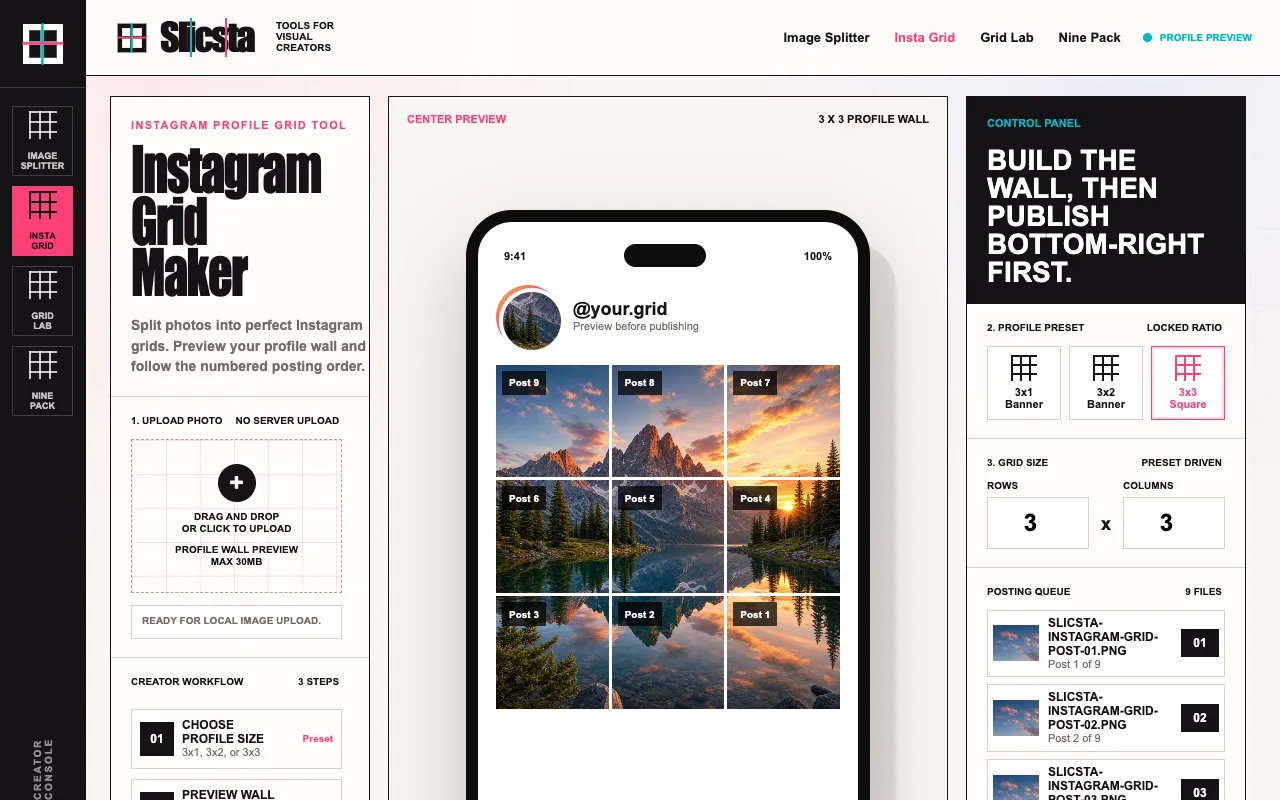
Photo Grid Splitter is a web-based tool that divides a single image into a multi-grid layout optimized for Instagram profiles. Users upload a photo and choose from three preset configurations—3x1, 3x2, or 3x3—to see exactly how the tiles will appear on a profile wall before publishing. The service outputs numbered grid pieces packaged together as a single ZIP file, removing the guesswork from tile sequencing. The live preview displays the finished grid layout, while the output queue labels the correct posting order so the final profile view aligns as intended. This tool is designed for creators who want to visualize and test their profile aesthetic before committing to a post.
How to use the Slicsta Photo Grid Splitter
- 1
Upload the photo you want to split into the tool's interface
- 2
Select your desired grid configuration from the available options (3x1, 3x2, or 3x3)
- 3
Review the live preview that shows how the tiles will appear on an Instagram profile wall
- 4
Follow the numbered labeling in the output queue to post tiles in the correct sequence
- 5
Download the complete set as a single ZIP file containing all split grid pieces
Best for
Creators who want to preview and test their Instagram profile layout before publishing, ensuring the final grid composition reads correctly when viewed as a whole.
Limitations
- No unit switching or custom grid sizes beyond the preset 3x1, 3x2, and 3x3 options
- Results depend on the original image composition and may require manual cropping adjustments
- The tool produces image tiles only; it does not integrate with or publish directly to Instagram
Photo Grid Splitter FAQ
- Which Instagram grid sizes does Slicsta support?
- The page supports 3x1, 3x2, and 3x3 profile grid presets for splitting a single photo into multiple tiles.
- Why does posting order matter for Instagram grids?
- Instagram shows newer posts first, so publishing the last visual tile first helps the final profile grid appear in the correct sequential order when viewed on a profile wall.
- Is this tool connected to Instagram or does it publish posts automatically?
- No. Slicsta only creates the image tiles; users download the files and publish them manually to Instagram.
- Can I preview how the grid will look on my profile before downloading?
- Yes. The tool provides a live preview showing exactly how the grid pieces will appear on an Instagram profile wall, allowing users to evaluate composition and aesthetic impact before downloading.
Similar tools
Based on shared tags